

How to Set Up a Discord Ticket System the Right Way (2026 Guide)
Learn how to set up a professional Discord ticket system with categories, support roles, ticket steps, and automation - the right way, from scratch.

Tuncion
Author

How to Set Up a Discord Ticket System the Right Way (2026 Guide)
Most Discord servers have a ticket system. Almost none of them have a good one.
They slap a button in a channel, assign a random role, and call it "support".
No categories. No steps. No automation. No structure.
That's not a support system - that's a DM inbox that everyone can see.
In this guide, you'll learn exactly how to set up a professional Discord ticket system from scratch - with the right categories, steps, roles, and automation - using TicketWave.
Why Your Discord Ticket System Setup Matters
A poorly configured ticket system causes:
- Staff confusion - who handles what?
- Users opening the wrong ticket type
- No structure to responses
- Tickets answered by the wrong team
- Chaos at scale
A properly configured one gives you:
- Clear routing - every ticket goes to the right person
- Faster responses - no back-and-forth confusion
- Professional experience - users feel heard immediately
- Scalability - works the same with 10 or 10,000 members
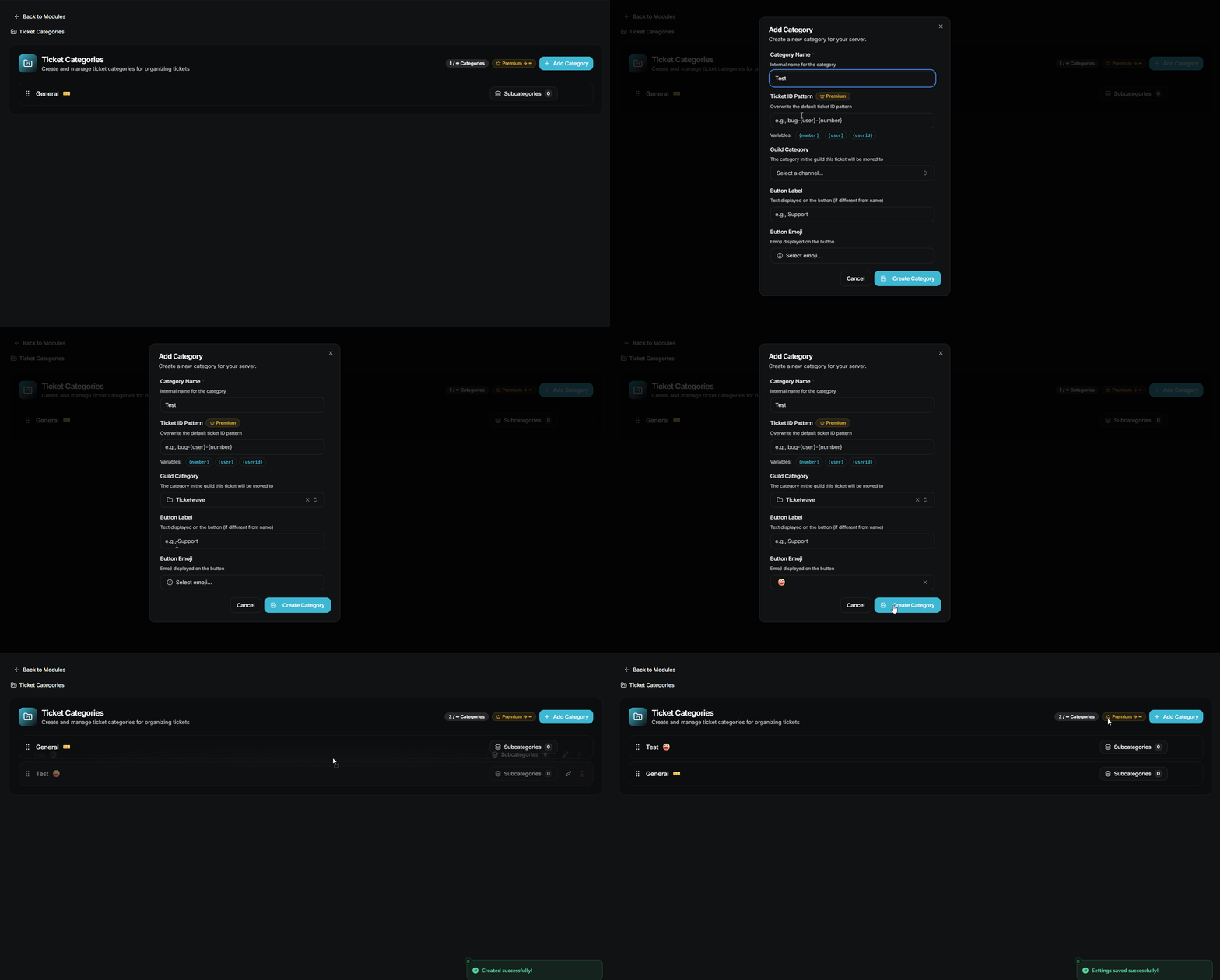
Step 1: Plan Your Ticket Categories
Before touching any settings, answer this:
What types of support does your server need?
Common categories for Discord servers:
| Server Type | Typical Categories |
|---|---|
| Gaming Community | Bug Report, Ban Appeal, General Support |
| FiveM / RP Server | Whitelist, Support, Staff Report, Ban Appeal |
| SaaS Product | Billing, Technical Support, Feature Request |
| Community Server | Report a User, Partnership, General |
Rule of thumb: Start with 3–5 categories. You can always add more later.
Step 2: Configure Your Ticket Panel
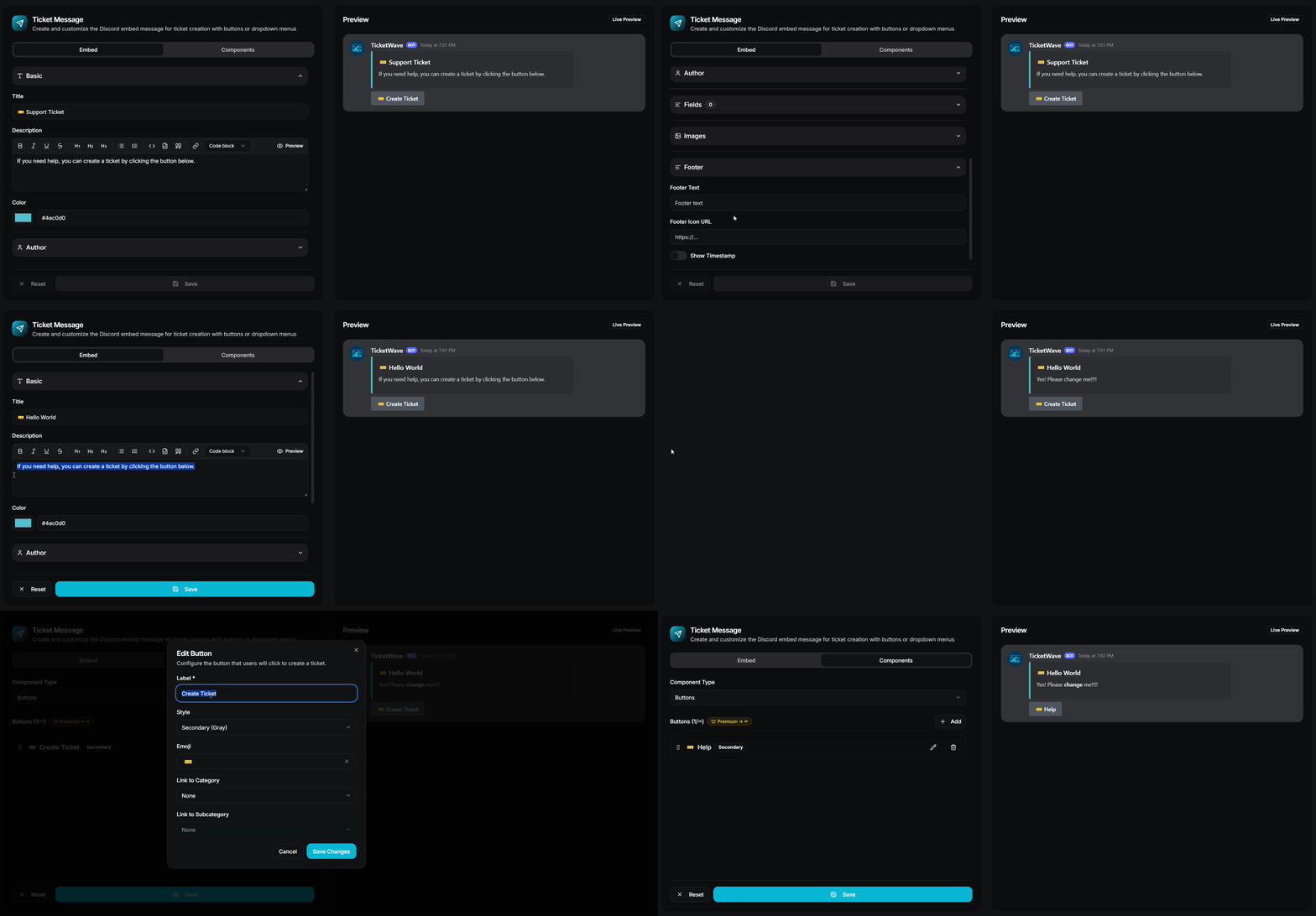
Your ticket panel is the first thing users see. Make it count.
What a good ticket panel includes:
- A clear title and description
- Instructions on what ticket type to open
- A button or dropdown menu for each category
- Your server's branding colors and logo
With TicketWave, you can fully customize:
🎨 Panel Branding
- Custom embed color
- Custom thumbnail
- Custom author name & icon
- Custom footer text & icon
🔘 Panel Buttons & Menus
- Up to 3 buttons/menus on free
- Unlimited buttons and menus Premium
- Custom emojis on each option Premium
Pro tip: Use a dropdown menu for servers with 4+ ticket types - it keeps the panel clean.
Step 3: Set Up Ticket Categories & Routing
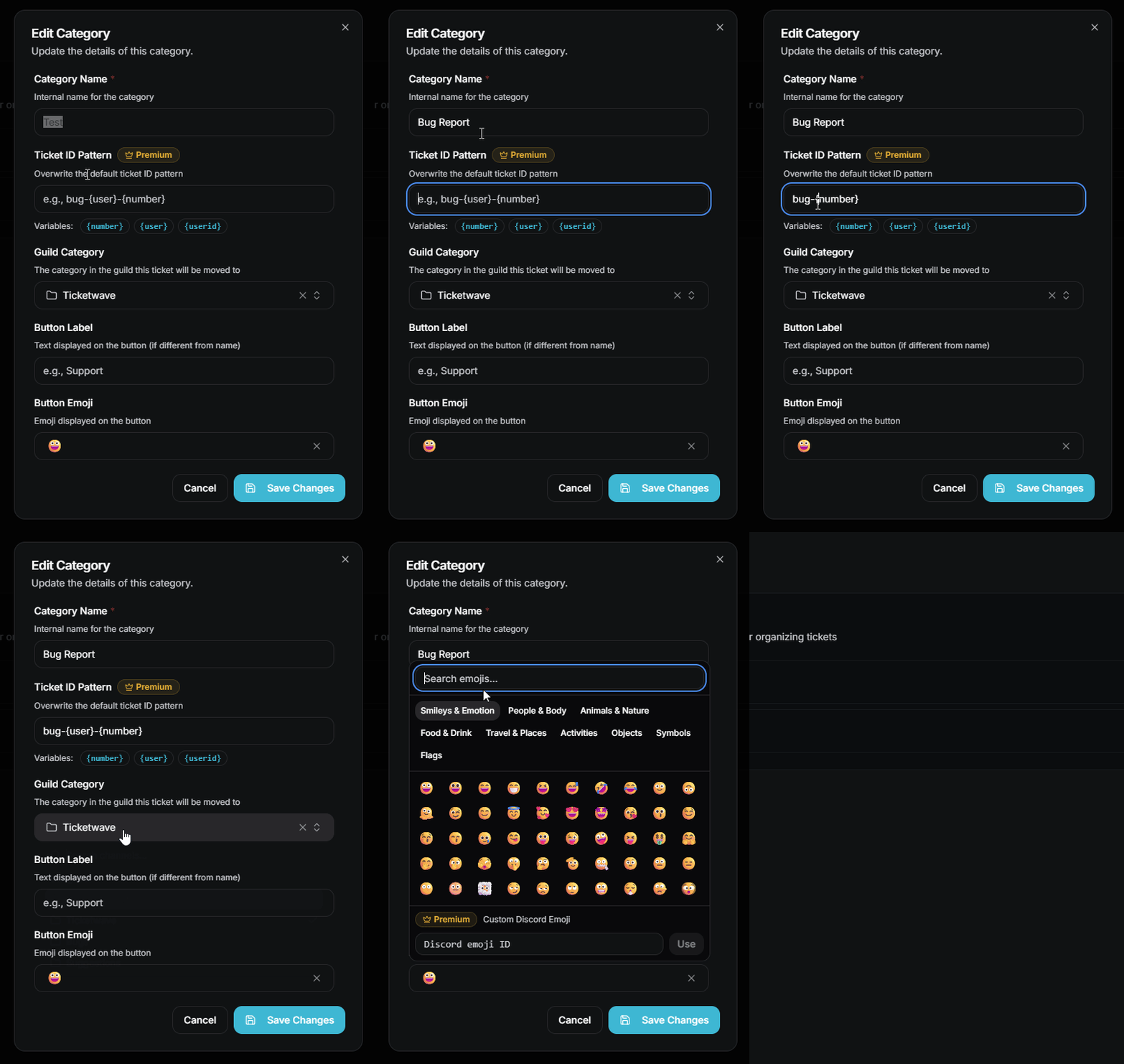
Ticket categories are the backbone of a professional support system.
With TicketWave's Category System, each category can have:
- Its own Discord channel category - tickets sort themselves automatically
- Its own ticket ID pattern - e.g.,
support-{number}orappeal-{user} - Custom emojis for visual distinction
- Subcategories for deeper routing (e.g., Billing → Refund / Upgrade)
Free vs Premium:
- Free: Up to 3 categories
- Premium: Unlimited categories + subcategories + custom emojis + per-category ID patterns
Step 4: Add Ticket Steps (Pre-Ticket Questions)
One of the most underused features in Discord ticket bots.
Ticket Steps collect information from users before the ticket is created - so your staff always has context from the first message.
Examples of powerful Ticket Steps:
- "Choose your server region" (NA/EU/ASIA)
- "Choose your experience?" (Beginner / Intermediate / Expert)
- "Which platform are you playing on?" (PC / Console)
- Steam / FiveM / GitHub OAuth authentication Premium



Why this matters:
- No more "hi" tickets with zero context
- Staff can start helping immediately
- Fewer back-and-forth messages
- Structured data for every ticket
With TicketWave, you can mark steps as required or optional, restrict them per category, and even trigger an auto-close if a specific option is selected.
- Free: 1 step
- Premium: Unlimited steps + auth integrations + per-category restrictions
Step 5: Assign Support Roles
Your support roles define who can see and manage tickets.
Best practices:
- Never give everyone access to all tickets
- Add an admin role with full bypass permissions
With TicketWave:
- Free: Up to 2 support roles
- Premium: Unlimited support roles
Step 6: Set a Ticket ID Pattern
Most bots use boring, random ticket names. TicketWave lets you choose:
ticket-0042support-usernameappeal-userid
Use the placeholders {number}, {user}, or {userid} - per panel or per category.


Discord Ticket System Setup Checklist
Use this before going live:
- Categories planned and created
- Panel embed styled and live
- Ticket Steps configured
- Support roles assigned
- Cooldown enabled
- Ticket limit per user set
- Blacklist configured
- Logging channel set
- Transcripts enabled
Frequently Asked Questions (FAQ)
What is the best Discord ticket bot in 2026?
TicketWave is one of the best newest Discord ticket bots available - with categories, steps, analytics, branding, and full automation.
How many ticket categories should I have?
Start with 3–5. Too many options confuses users. Use subcategories if you need more granularity.
Can I require users to answer questions before submitting a ticket?
Yes. TicketWave's Ticket Steps system collects information before submission - including OAuth authentication for FiveM/Steam/GitHub.
How do I organize tickets by type automatically?
TicketWave's Category-Based Ticket Sorting moves each new ticket to the correct Discord category automatically.
Is TicketWave free to use?
Yes. TicketWave has a generous free tier. Premium unlocks unlimited categories, steps, general branding, advanced analytics, and more.
➡️ Ready to Build a Real Support System?
Stop guessing. Set it up right the first time.
TicketWave has everything you need - panels, categories, steps, roles, and automation - all in one bot.
👉 Add TicketWave to your Discord server
https://ticketwave.dev/invite
👉 Open the Dashboard
https://ticketwave.dev/dashboard
Final Thought
A ticket system isn't set up in 5 minutes.
But done right - it looks like it was.
Every user who opens a ticket should feel like they're talking to a professional team.
Set it up right - or spend every day fixing the same problems 😉


