

Discord Ticket Panel Design: The Complete Guide to Less Confusion, and Cleaner Support
Your ticket panel is the front door to your entire support system. Get it wrong and every ticket that follows pays the price. Here's how to design one that actually works.

Tuncion
Author

Discord Ticket Panel Design: The Complete Guide to Less Confusion, and Cleaner Support
Most Discord servers treat their ticket panel as an afterthought. That's exactly why most Discord support systems feel broken from the first interaction.
The panel is not just a button in a channel. It's the entry point to your entire support workflow. Everything that follows - the ticket quality, the response time, the staff experience - is shaped by what happens in those first few seconds when a user lands on your panel.
Get it right, and users open the correct ticket with the right information. Get it wrong, and you're dealing with confused users, misrouted tickets, and staff wasting time asking "so, what's your actual issue?"
This guide covers everything: copy, structure, buttons vs dropdowns, branding, placement, and the mistakes that silently destroy ticket quality every day.
🚀 Haven't set up your ticket system yet? Start with our complete guide: How to Set Up a Discord Ticket System the Right Way
Why Ticket Panel Design Directly Affects Support Quality
Here's the chain reaction that most server owners miss:
Unclear panel → wrong category selected → ticket routed to wrong team → staff asks clarifying questions → user repeats themselves → slower resolution → frustrated everyone
That entire chain starts with the panel.
A well-designed ticket panel does three things automatically:
- Filters intent - users self-select into the right category before any staff involvement
- Sets expectations - users understand what support covers and what it doesn't
- Reduces noise - clear options mean fewer "which ticket type do I use?" messages in your general chat
If you're seeing low-quality tickets, misrouted tickets, or users opening duplicate tickets - look at the panel first. That's almost always where the problem begins.
Anatomy of a High-Performance Ticket Panel
The Title
The title is the first thing users read. It needs to do actual work.
Weak titles:
SupportHelp DeskNeed Help?
These tell the user nothing. They don't know what kind of support you offer, who it's for, or what to expect.
Strong titles:
Open a Support, Billing, or Appeal TicketFiveM Server Support - Choose a Category BelowGet Help with Your Account, Order, or Access Issue
The goal is to make the title answer the question: "Is this for me, and what can I get help with here?" - before the user reads another word.
The Description
This is where most panels either earn trust or lose it entirely.
What your description should do:
- Tell users exactly how to use the panel (which option to pick)
- Set one or two key rules upfront (e.g., one ticket per issue, no spam)
- Create a brief expectation of response time if applicable
What your description should NOT do:
- List every rule you have ever thought of
- Include lore about your server or community history
- Repeat information that the button labels already communicate
Here's a template that could be used:
Select the option below that matches your issue. Open one ticket per problem - duplicate tickets may be closed without a response. Abuse or spam can result in a cooldown or blacklist.
That's 30 words. It does the job. Nobody reads more than that anyway.
Button Labels and Dropdown Options
This is where the real routing happens. Your labels are not just text - they are navigation.
Principles for writing good labels:
| Principle | Bad Example | Good Example |
|---|---|---|
| Be specific, not vague | Support |
Technical Support |
| Name the action or category | Click Here |
Ban Appeal |
| Avoid internal jargon | Tier 1 Inquiry |
General Help |
| Keep it short | I Need Help With My Account |
Account Help |
Users are making a split-second decision when they look at your buttons. If they're not 100% sure which one fits their issue, they'll either pick the wrong one or leave without opening a ticket.
Use nouns, not verbs. Buttons in Discord feel most natural when labeled with the category rather than an action. Billing reads better than Submit Billing Inquiry. Bug Report reads better than Report a Bug.
Buttons vs Dropdown Menus - When to Use Each
This is one of the most common questions about ticket panel design, and the answer is straightforward once you understand how users interact with each.
Use buttons when:
- You have 2–3 ticket categories
- The categories are visually distinct enough to stand alone
- You want maximum visibility - buttons are impossible to miss
Use a dropdown menu when:
- You have 4 or more ticket categories
- Categories are similar enough that grouping them reduces confusion
- You want a cleaner panel without a wall of buttons
The practical rule: If you can describe all your ticket types in 3 words each and still have them feel distinct, use buttons. If you need more than 3 options or the categories need a bit more context to understand, use a dropdown.
With TicketWave, you can choose between buttons or dropdown. You could make a general support button and then the system ask for the right category or you could link your buttons or dropdown options directly to categories to speed up the process.
📂 Want to design the right categories to pair with your panel? See our guide: Discord Ticket Categories: How to Organize Support at Scale
Ticket Panel Copy: Real-World Templates by Server Type
Here are production-ready panel copy examples for the most common Discord server types. Use them as-is or adapt to your needs.
🎮 Gaming Community
Title: Server Support - Get Help Below
Description: Select the option that fits your issue. One ticket per problem. Staff typically respond within a few hours.
Options:
- 🐛 Bug Report
- 🔨 Ban Appeal
- 💬 General Support
- 🤝 Report a Player
🐌 FiveM / RP Server
Title: FiveM Support - Open a Ticket
Description: Choose the correct category for your issue. False ban appeals or spamming tickets may result in a permanent blacklist.
Options:
- 📋 Whitelist Application
- 🆘 In-Game Support
- ⚖️ Ban Appeal
- 🚨 Staff Report
- 💰 Donation Issue
💻 SaaS / Digital Product
Title: Customer Support
Description: Select the option that best matches your issue. For billing questions, have your order ID ready before opening a ticket.
Options:
- 💳 Billing & Payments
- 🛠️ Technical Issue
- 🔐 Account Access
- 💡 Feature Request
🌐 Community / Social Server
Title: Help & Reports
Description: Use the options below to get help or report an issue. Abuse of the ticket system may result in a mute or ban.
Options:
- 🚩 Report a User
- 🤝 Partnership Request
- ❓ General Question
Where to Place Your Ticket Panel
The placement of your panel matters more than most people realize.
Best practices:
- Dedicated
#open-a-ticketchannel - Isolates the panel from noise. Users know exactly where to go. - Position in the channel list - Place it near the top of your support category, ideally below your
#rulesand#announcementschannels. - No other content in the channel - Don't mix your panel with general information or pinned messages that push the panel out of view. The panel should be the only thing users see when they open the channel.
- Pin or lock the channel - Users should not be able to send messages in the panel channel. This prevents clutter and keeps the panel always visible.
What you should avoid:
- Dropping the panel into
#generalor any high-traffic channel - Placing it so far down the channel list that users have to scroll to find it
- Embedding it inside a wall of server rules or onboarding messages
Branding Your Ticket Panel
A generic-looking panel sends a subtle but damaging message: "we didn't put much thought into this."
Your ticket panel should look like it belongs to your server - same colors, same tone, same level of care as the rest of your setup.
With TicketWave, you can customize all for free:
- Embed color - Match your server's brand color
- Thumbnail image - Your server logo or a relevant icon
- Author name and icon - Add your server name or bot alias at the top of the embed
- Footer text and icon - Add a tagline, version number, or response time SLA
- Custom emojis on buttons and menu items - Add visual identity to each ticket category
Use our Embed Builder to create your panel interactively and see how it looks before you save it.
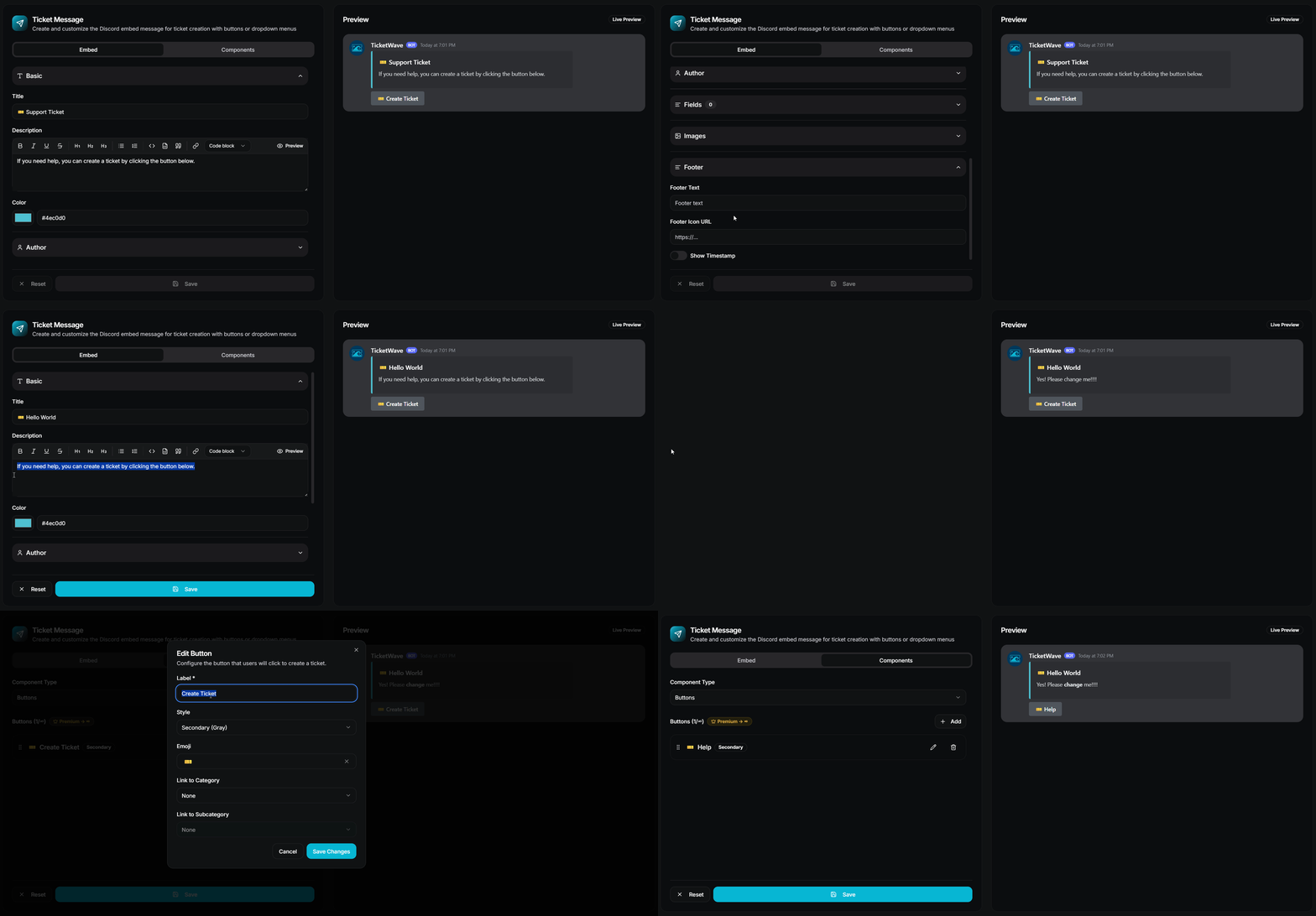
The goal isn't to be flashy. The goal is consistency. A panel that matches your server's identity is a panel users trust before they've even read a word.
The 7 Ticket Panel Mistakes That Quietly Destroy Support Quality
1. Using a single "Support" button with no categories
One button means every ticket looks the same to your staff. There's no routing, no context, and no way to prioritize. This is the most common mistake and the one with the most downstream damage.
2. Writing descriptions nobody reads
Walls of text get ignored. If your description is longer than 3–4 short sentences, most users won't read any of it. Worse, if you bury a critical rule (like "only one ticket per issue") in paragraph four, users will never see it.
3. Labels that mean different things to different people
"General Support" to you might mean anything that doesn't fit elsewhere. To your users it might look like the default catch-all for everything. If a category name is ambiguous, it will be misused - every time.
4. Placing the panel where nobody looks
A ticket panel in a channel that's buried below 30 others, or sandwiched between pinned announcements, is a panel that gets ignored. If users can't find it without scrolling, they'll ask in chat instead - which defeats the purpose.
5. No rules or expectations on the panel
If your panel doesn't mention consequences for abuse (spam, duplicate tickets, false appeals), you'll get all three - regularly. Users push boundaries when they don't see any.
6. Too many options
Decision fatigue is real. When you present eight or ten ticket categories to a user, they stop reading and start guessing. More options do not mean better routing - they mean worse routing with more noise.
7. Never updating the panel after setup
Your support categories evolve. Your server grows. If your ticket panel still reflects the layout you set up a year ago, it's probably sending users to the wrong place. Review your panel every few months. Make sure every option is still relevant.
How TicketWave Gives You Full Control Over Panel Design
TicketWave is built around the idea that your ticket panel should do real work - not just look like one.
On any plan, you get:
- Full embed branding (color, thumbnail, author, footer)
- Custom embed title and description
- Button and dropdown menu creation
- Multiple panels in multiple channels
- Category-based ticket routing
On Premium, you also get: Premium
- Unlimited panels, categories, and subcategories
- Custom emojis on every button and menu item
That's the difference between a panel that helps users click and a system that delivers context automatically.
Frequently Asked Questions
What should I write in my Discord ticket panel description?
Keep it to 2–4 sentences. Tell users how to use the panel (pick the right option), set one or two basic rules (one ticket per issue, no abuse), and briefly mention what to expect. Anything more will go unread.
Your rules are only to inform your user. You should use every feature which is available to technically enforce those rules (e.g., one ticket per user, cooldowns, blacklists) instead of relying on users to read and follow them.
Should I use buttons or a dropdown menu for my ticket panel?
Use buttons if you have 2–3 clearly distinct ticket types. Use a dropdown if you have 4 or more.
How many ticket categories should I have?
Most servers work best with 3–5 categories. Start with fewer and add more only when a genuine need emerges from your ticket volume. More categories do not mean better support - they mean more decisions for users to get wrong.
Can I brand my ticket panel with my server's colors and logo?
Yes, with TicketWave - no premium plan needed! You can set a custom embed color, thumbnail, author name, author icon, footer text, and footer icon.
Does where I place the ticket panel actually matter?
Significantly. A panel in a dedicated, clearly named channel near the top of your channel list gets used correctly far more often than one buried inside general information channels. Visibility drives correct behavior.
What happens if users keep picking the wrong ticket category?
Usually this is a label problem, not a user problem. Review your button/dropdown labels and make them more specific. You can also use Ticket Steps in TicketWave to ask a clarifying question, which catches misrouted tickets before your staff writes many messages.
➡️ Build a Ticket Panel That Does Real Work
A great ticket panel is not about aesthetics. It's about clarity, routing, and trust - and all of that is built before the ticket ever opens.
If your current panel is a single "Support" button with no description and no branding, you're leaving support quality on the table every single day.
TicketWave gives you the tools to fix that - from the first click to the closed ticket.
👉 Add TicketWave to your Discord server
https://ticketwave.dev/invite
👉 Configure your panel in the Dashboard
https://ticketwave.dev/dashboard
Final Thought
Users make a judgment call about your support system in the first three seconds.
A clear, well-structured, on-brand ticket panel says: "this server is organized and your issue will be handled properly."
A messy, vague, or generic panel says the opposite - before your staff has even had a chance to prove themselves.
Design the panel like it matters. Because it does.


