

FiveM Discord Ticket System: Best Practices for RP and Scripting Stores Servers
Running a FiveM server? Learn how to build a Discord ticket system for whitelist, support, bans, and reports with the right workflow and verification steps.

Tuncion
Author

FiveM Discord Ticket System: Best Practices for RP and Scripting Stores Servers
FiveM servers do not have normal support problems. They have volume, urgency, and drama.
Whitelist issues.
Ban appeals.
Ingame problems.
Player reports.
If all of that flows into one generic ticket channel, your staff will drown.
In this guide, you'll learn how to build a FiveM Discord ticket system that keeps support organized and easier to manage as your community grows.
🔧 New to Discord ticket systems entirely? Start with the full setup guide: How to Set Up a Discord Ticket System the Right Way
Why FiveM Servers Need Better Ticket Structure
Roleplay communities generate different types of support:
- Whitelist applications and verification
- Technical support
- Ban appeals and moderation reviews
- Store and Tebex issues
- Staff or player reports
Each of those needs different information and often different staff.
That is why generic ticket setups fail in RP communities.
Why FiveM Scripting Stores Need Better Ticket Structure
Scripting store servers get hit with a lot of support tickets, and they need to be handled quickly:
- Order issues
- Payment problems
- Refund requests
- Bug reports
- General questions
If all of those go into the same ticket queue, your team will be overwhelmed.
Recommended Ticket Categories for FiveM Servers
Start with categories like these:
- Whitelist Support
- Technical Support
- Ban Appeal
- Report a Player
- Tebex / Store Issue
Keep the top-level choices obvious. Users should know where to click immediately.
📂 Want a deeper look at category design? See our full guide: Discord Ticket Categories: How to Organize Support at Scale
Use Verification Steps Before Ticket Creation
This is where many FiveM servers lose control.
Before your staff review the ticket, users should provide:
- Their in-game name
- Some other specific details
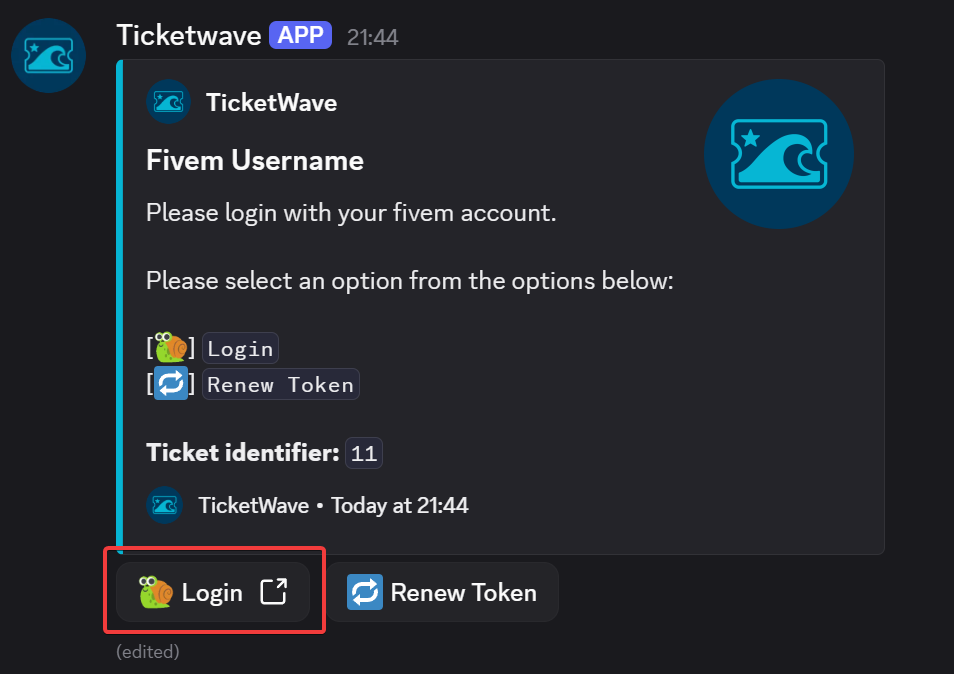
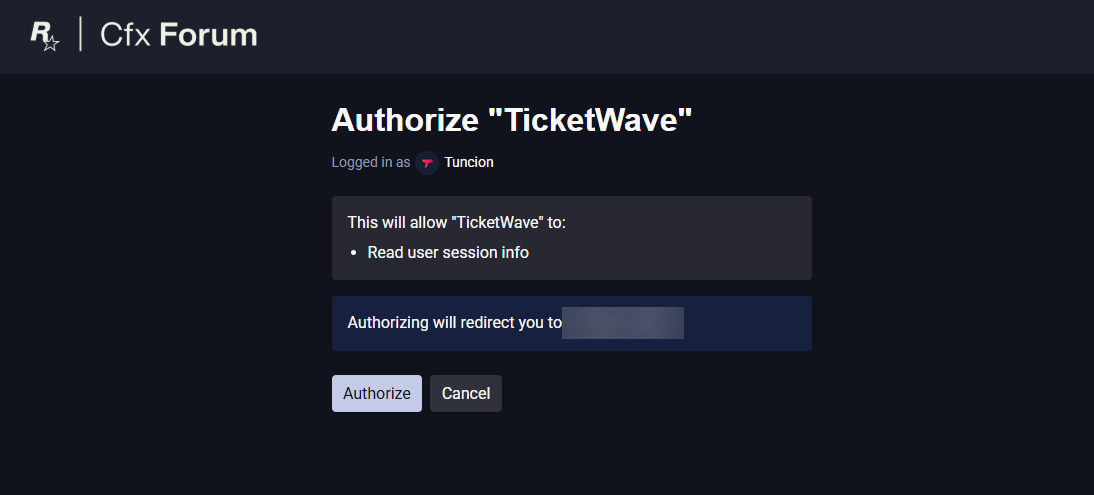
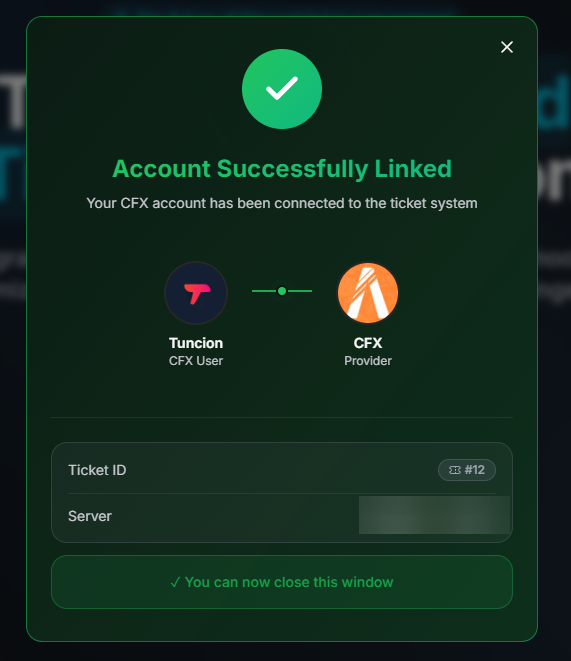
TicketWave's Ticket Steps system supports structured intake, and includes a CFX / FiveM Auth Step Premium for stronger verification. The user need to authenticate with their CFX Id before they can submit the ticket, which proves they are who they say they are.
-
The FiveM authentication step shows a login button that opens a new tab in the user’s browser.
-
The user must then log in with their CFX account and authorize the bot to access their basic information (username and CFX ID).
-
After successful authentication, the user is redirected to our website, where they see a success message.
-
The user’s correct username and ID are now displayed in the Discord ticket, which is extremely useful for support staff who need this information.
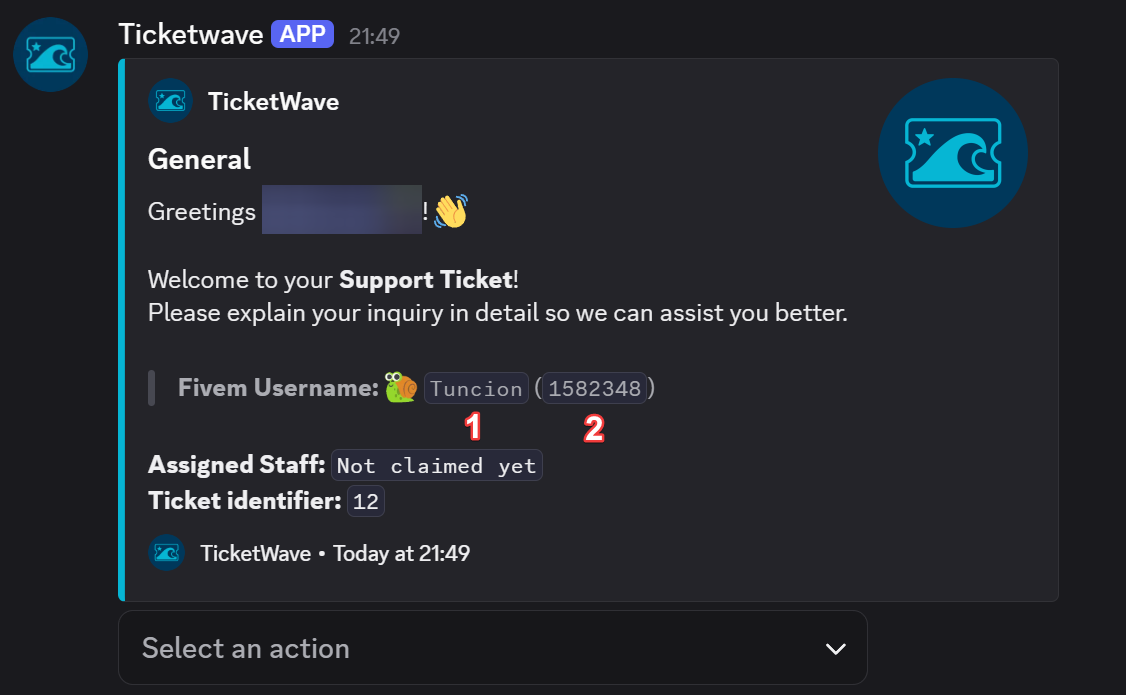
- FiveM Username
- FiveM ID
That is extremely useful for whitelist and identity-based cases.
Separate Sensitive Workflows
Player reports and ban appeals should not be handled like general support.
They often need:
- Limited staff visibility
- Internal discussion
- Transcript history
- Clear ownership
TicketWave helps with this through support roles, claim tools, staff threads, logging, and transcripts.
📋 Transcripts are critical for appeals and moderation cases: Discord Ticket Transcripts: Why Every Server Needs Them
Anti-Abuse Is Mandatory for Store Servers
Store communities get spammed harder than most business servers.
Use:
- Ticket open limits
- Cooldowns
- Blacklist
- Captcha
That protects your support queue from trolling, duplicate appeals, and mass spam.
Why TicketWave Fits FiveM Communities
TicketWave is especially useful for communities that need both flexibility and control.
FiveM servers benefit from:
- Categories and subcategories
- Ticket steps with auth support
- Staff threads for internal review
- Transcripts for appeals and reports
- Analytics for support team performance
That combination is difficult to replace with a basic ticket bot.
Frequently Asked Questions (FAQ)
What is the best Discord ticket setup for a FiveM server?
A setup with separate categories for whitelist, technical support, ban appeals, player reports, and store issues works best for most communities.
Can TicketWave verify users before ticket creation?
Yes. TicketWave supports structured ticket steps and includes a CFX / FiveM authentication step Premium
Should FiveM ban appeals have their own ticket category?
Yes. Appeals are sensitive and usually need separate staff visibility, internal discussion, and strong logging.
How do I stop ticket spam on a FiveM Discord?
Use ticket limits, cooldowns, captcha, and blacklists to protect the queue from abuse.
➡️ Build a Better FiveM Support Flow
FiveM communities move fast, and support can get messy even faster.
TicketWave helps you structure the whole workflow so whitelist issues, reports, and appeals stop colliding with each other.
👉 Add TicketWave to your Discord server
https://ticketwave.dev/invite
👉 Open the Dashboard
https://ticketwave.dev/dashboard
Final Thought
The more serious your RP community gets, the less room there is for a generic ticket setup.
FiveM support works best when every path has structure before the first message is even sent.


