

Discord Holiday Mode: How to Pause Support Without Creating Chaos
Need to pause Discord support during holidays, vacations, or downtime? Learn how holiday mode works and how to avoid confusion and frustrated users.

Tuncion
Author

Discord Holiday Mode: How to Pause Support Without Creating Chaos
The fastest way to create a support disaster is to go offline over a longer period without changing your ticket system.
Users keep opening tickets.
Nobody answers.
The backlog grows. Expectations break. Your team returns to a mess.
In this guide, you'll learn how to use Discord holiday mode to pause support cleanly during vacations, maintenance, or low-staff periods without damaging user trust.
Why Servers Need Holiday Mode
Support does not stop being a system just because your team needs a break.
If tickets stay open during downtime, you create:
- Unmet response expectations
- Bigger backlogs
- More duplicate tickets
- Frustrated users
- Burnout for the team returning later
Holiday mode fixes that by setting clear boundaries before things get messy.
When to Use Discord Holiday Mode
Holiday mode is useful for more than holidays.
Use it when:
- Your team is on vacation
- You are short-staffed for a few days
- Your product is in maintenance
- Your community is paused for an event
- You need to stop new tickets temporarily while clearing backlog
This is not a niche feature. It is operational hygiene.
What a Good Holiday Mode Should Do
At minimum, it should:
- Prevent new ticket creation or clearly inform the user
- Show a clear custom message
- Explain when support returns
- Optionally provide a reason
TicketWave's Ticket Holiday system does exactly that Premium
You can configure:
- Start and end dates
- A custom holiday message
- A custom reason
- Full prevention of new ticket creation OR a message that shows when users fulfill the ticket creation and wrote their message.
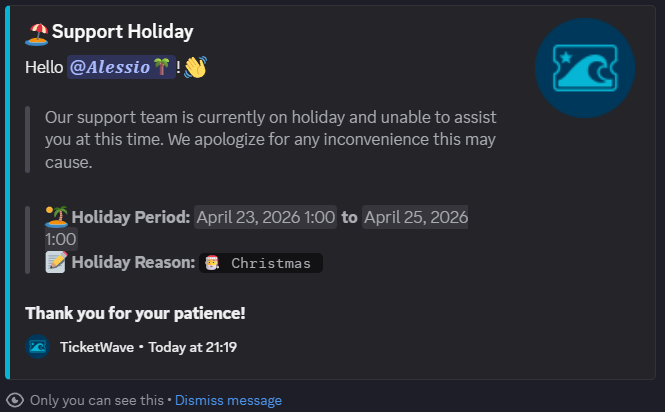
The Biggest Holiday Mode Mistakes
Saying nothing
Users assume support is active because the panel still works.
Leaving tickets open during downtime
This creates false expectations and queue inflation.
Returning without a plan
If your team comes back to a pile of old tickets, response quality drops immediately.
No message clarity
"Support unavailable" is weak. Tell people what is happening and when to expect normal service again.
➡️ So how should your user understand your break if you don't tell why and when? The user is left to guess, and that creates frustration and confusion.
Best Practices for Support Downtime
1. Turn holiday mode on before downtime starts
Do not wait until the team is already gone. Plan ahead and set expectations before the first ticket is opened during the break.
2. Use a specific message
Tell users why support is paused and when it will return. Vague messages create more questions than answers.
3. Keep your tone calm and direct
You are setting expectations, not apologizing for existing.
4. Pair it with backlog planning
If you expect a surge after reopening, make sure staff coverage is ready.
👥 Learn how to structure your team to handle post-downtime surges: How to Build a Discord Support Team That Scales
5. Review analytics after reopening
Watch ticket volume, response time, and category spikes when support resumes.
📊 Use our analytics guide to track ticket spikes when support resumes: How to Track Discord Support Staff Performance (Analytics Guide 2026)
How TicketWave Helps
TicketWave makes holiday mode practical instead of manual.
You can stop new tickets, show a branded explanation, and reopen on a controlled schedule without deleting panels or confusing your community.
That matters because improvised downtime handling usually causes more support work later.
Frequently Asked Questions (FAQ)
What is Discord holiday mode?
It is a support setting that temporarily prevents new tickets from being created and shows users a message explaining the pause.
Can TicketWave pause ticket creation automatically?
Yes. TicketWave includes a holiday system with start and end dates, custom messages, and a reason field Premium
Should I close existing tickets during downtime?
That depends on your workflow, but you should at least stop new ticket creation or clearly inform users and set expectations clearly.
Is holiday mode only for vacations?
No. It is useful for maintenance, staffing gaps, temporary backlog control, and any planned downtime.
➡️ Pause Support the Clean Way
Downtime does not have to create confusion.
With TicketWave, you can pause support cleanly, communicate clearly, and come back without a broken queue.
👉 Add TicketWave to your Discord server
https://ticketwave.dev/invite
👉 Open the Dashboard
https://ticketwave.dev/dashboard
Final Thought
Support teams need breaks.
🏝️ The mistake is not taking one. The mistake is pretending your system can keep running normally when nobody is there.


